
Create a Wallet
Understand wallets, addresses and keys before creating a new wallet environment on a trusted device.
Learn the basics →A multi-chain wallet, blockchain network and Web3 knowledge hub from imtoken
Move from multi-chain asset awareness and network selection to sending, receiving, DApp connections, signatures, approvals and wallet security in one clear learning path. Understand addresses, networks and transaction confirmations before interacting with contracts, and treat key protection and request review as part of every action.
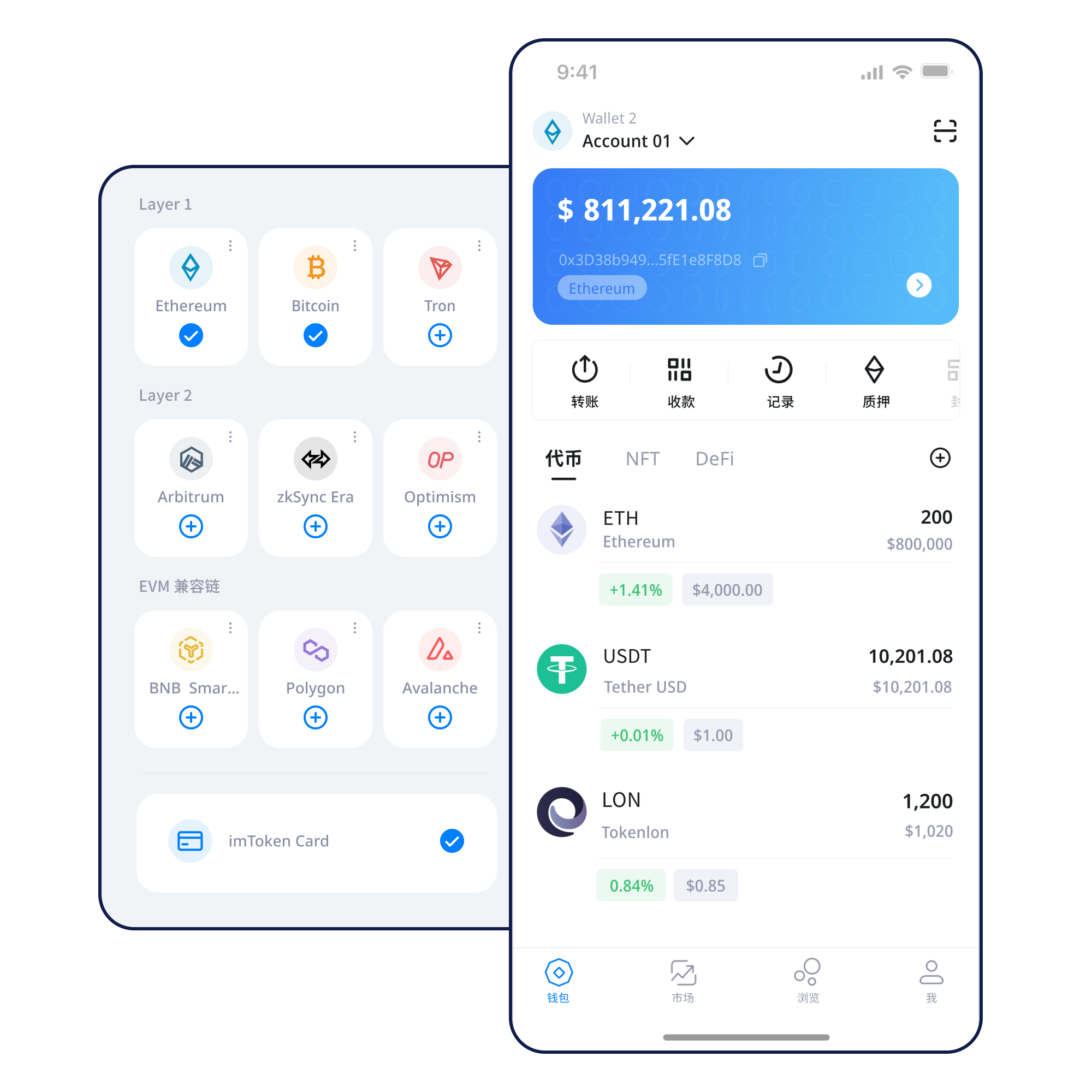
Understand wallets, addresses and keys before creating a new wallet environment on a trusted device.
Learn the basics →Keep your seed phrase offline. Avoid screenshots, cloud copies and sharing it with anyone.
Backup principles →Check both the receiving address and the network instead of relying on the token name alone.
Receiving steps →Review address, network, amount and gas before signing; use the transaction hash afterward.
Sending checks →A connection is not blanket consent. Review each signature and approval request separately.
Connection guide →A multi-chain wallet can organize information across networks, but it does not merge those networks. Safer use comes from knowing where an action takes place, which address or contract it involves, and what a signature will change.
Separate the network, asset and address context. Switching networks does not move assets across chains.
Understand multi-chain use →View assets, manage networks, review transaction history and inspect DApp requests from a mobile environment.
Explore the App →Check addresses and networks when receiving; review amount, gas and transaction details when sending.
View the flow →Understand browser connections, account requests, signatures, approvals and disconnecting sessions.
Web guide →
Seed phrases and private keys stay under the user’s control. Legitimate support should never ask for them.
Open Security →Different chains have independent nodes, blocks, gas and confirmation rules. A similar-looking address does not make assets directly interchangeable across networks.
Identify where an asset is located and where the destination expects it. Switching networks changes context; it does not bridge an asset.
Learn more →Nodes maintain shared state, transactions enter blocks and confirmations increase as the chain advances.
Public-chain basics →
Similar account and contract models do not make separate EVM networks interchangeable. Check both network and contract.
EVM guide →
Learn how Layer 2 relates to mainnet, how bridging works and why exits or confirmations can involve waiting.
Layer 2 basics →
Gas varies with network conditions and execution complexity. Check the original transaction hash before resubmitting.
Fees and confirmations →Each step prepares for the next: control the keys first, understand the network, then receive, send and interact with Web3.
Use a trusted entry point and start the download yourself rather than relying on unsolicited links.
Use a trusted device and avoid public computers, screen sharing or unknown remote-control sessions.
Store the seed phrase offline and never disclose private keys, recovery words or verification codes.
Confirm where the asset actually lives and which network the destination supports.
Review address, network, amount and gas. Use a small test when learning a new route.
Use transaction hashes for on-chain status, inspect DApp requests and remove permissions you no longer need.
A site connection may expose an account for interaction, while later signatures, approvals and transactions can have very different consequences. Stop when a request is unclear.
Use a trusted path.
Check spelling and context.
See which account is requested.
Expose only what is needed.
Check network, address, contract and permission.
Verify the result on-chain.
Review stale approvals later.
Wallet security is a continuous practice across creation, backup, transfers and Web3 interactions. Keep seed phrases and private keys under your own control; legitimate support should never ask for them or for verification codes. Review the address, network and amount before transferring. Inspect the target and permission scope before signing or approving. Remove permissions that are no longer needed. Third-party DApps and smart contracts carry separate risk, while public devices, public networks and remote-control tools can increase exposure. On-chain transactions usually cannot be reversed by a wallet provider, so pre-transaction review matters more than promises of recovery.
Open SecurityStart with addresses, seed phrases, private keys and networks, then move to gas, transaction hashes, DApps and token approvals. With those concepts in place, questions about missing assets, confirmations and unfamiliar signature prompts become easier to diagnose.
Read the beginner path →Blocks, confirmations and explorers.
Gas, contracts and tokens.
Mainnet, bridging and waiting.
Targets, allowances and review.
Find essential terms quickly.
Staking content explains protocol mechanics, validators, exits, waiting and risk without presenting historical rewards as fixed returns.
Ethereum PoS uses validators in consensus. Reward sources and network conditions can change, while entry and exit can involve waiting.
Understand staking →Validators may face network penalties. Smart contracts can fail, digital-asset prices can move and third-party services add separate risks.
Understand validators →When no verified date is available, notices use non-fabricated labels and never invent partnerships, licenses, user counts, trading volume or market rankings.
A clearer route across creation, backup, network selection, transfers and transaction review.
Check the transaction hash before repeating an action during periods of network congestion.
Every signature and approval should be evaluated separately after connecting to a DApp.
Review network, transaction hash, contract and approvals without submitting sensitive credentials.
The full FAQ covers wallets, networks, gas, DApps, security, Ethereum PoS and validators.
Downloads are user initiated. Review backup, network and transaction-check principles before you begin.